
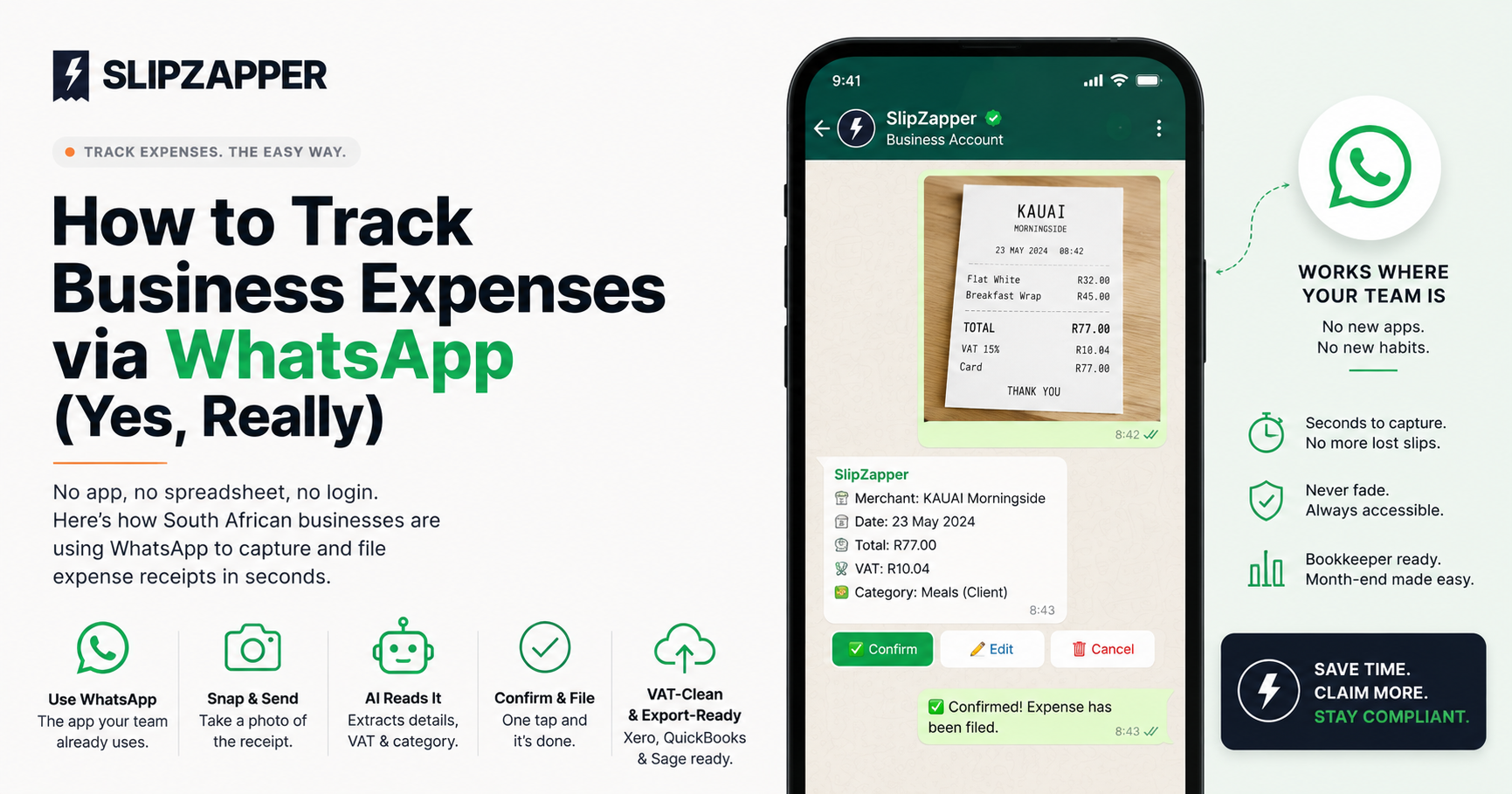
How to Track Business Expenses via WhatsApp (Yes, Really)
If you told most finance managers five years ago that expense tracking would eventually run through the same app they use to chat to their mom, they'd have assumed you were joking. But it's exactly the kind of shift that makes sense once you think about it: WhatsApp is already open on every employee's phone, all day, every day. Making expense capture ride on top of that habit, instead of competing with it, is why it actually works.
Here's how it plays out in practice.
The problem it solves
Most expense apps fail for one simple reason: people forget to open them. The receipt gets shoved in a pocket "for later", and later either never comes or comes weeks after the fact, by which point the slip has faded, the memory of what it was for has faded too, and nobody's excited to reconstruct either.
WhatsApp sidesteps that entirely. Nobody has to remember to open a separate app, log in, or navigate a menu. If someone already has the habit of texting a photo to a friend, they already have the habit needed to file an expense.
How it actually works, step by step
- Save the business's WhatsApp number. Every cardholder saves one contact, once. That's the entire setup.
- Snap the slip and send it. Straight from a business lunch, a fuel stop, a supplier's till point, whatever it is. No app to open, no photo library to dig through afterward.
- The AI reads the receipt. Merchant name, date, total, VAT, and category get extracted automatically, the same way a person would read a slip, just faster and without getting bored halfway through a stack of them.
- Tap to confirm. Quick reply buttons show up right under the extracted details: Confirm to file it as-is, Edit if a detail needs correcting, or Cancel to drop it. One tap, no typing, and it's done.
- It's filed, VAT-clean, against the right card. Multi-card support means the system knows which card the expense belongs to without anyone needing to specify it manually.
The entire loop, from slip in hand to properly filed expense, takes less time than it takes to order the coffee the receipt was for.
Why this beats the alternatives
Compared to a shoebox: nothing fades, nothing gets left in a jacket pocket, and nothing needs a month-end excavation.
Compared to a dedicated app: there's no download, no login to remember, no separate habit to build. The habit already exists; this just gives it somewhere useful to go.
Compared to email: WhatsApp is faster to open one-handed, works well from a business lunch or a petrol station forecourt, and doesn't require typing a subject line or finding the right forwarding address mid-transaction. (Though for supplier invoices that land in an inbox rather than a wallet, email-forwarding has its place too. It's about using the right channel for the moment, not picking one and forcing everything through it.)
It's not just for slips in your hand
The same channel handles supplier invoices too. Forward a WhatsApp-based supplier invoice straight through, and it gets read and filed the same way as a photographed till slip. If a foreign currency is involved, say a USD software invoice or a EUR taxi receipt, it gets converted automatically at the current spot rate, so what lands in your books matches what actually hits the card statement.
What this means for a bookkeeper at month-end
Instead of a stack of paper and a guessing game about half a dozen unexplained card charges, every expense is already captured, categorised, and VAT-split by the time month-end rolls around. The export is Xero, QuickBooks, or Sage-ready, which means month-end stops being a reconstruction project and starts being a five-minute review.
Try it without changing how your team already works
That's the underlying idea behind SlipZapper's WhatsApp bot: meet people where they already are, instead of asking them to adopt a new habit. Save the contact, snap the slip, tap Confirm. The receipt is read, categorised, and filed with the VAT on its own line, ready for your bookkeeper before you've even sat back down at your desk.
Start your 30-day free trial →
Related reading: The Real Cost of Lost Receipts for SA Businesses · SARS Receipt Requirements: What You Actually Need to Keep